



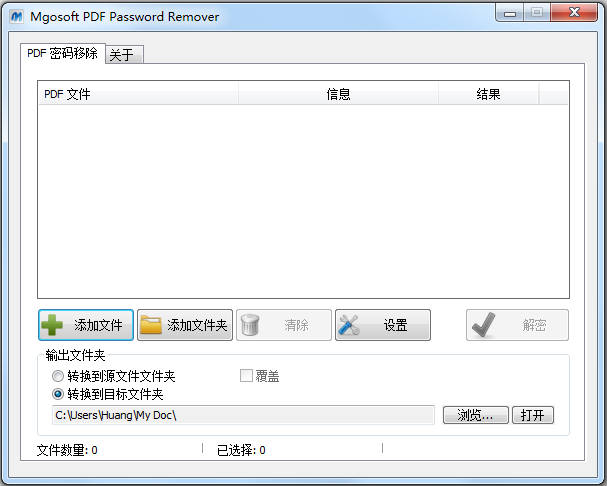
Mgosoft PDF Password Remover是一款PDF密码移除工具,可用于删除 Adobe Acrobat PDF 文件的安全性密码。 它可以帮助您从不允许编辑,更改,打印,复制,添加注释等的原始 PDF 文件生成没有密码的 PDF 文件。
PDF密码移除器特色
1、独立程序。不需要 Adobe Acrobat 或 Reader。
2、解密受所有者/主密码保护的 PDF 文件。
3、仅当您具有 PDF 文件的用户/打开密码时,才从 PDF 文件中删除用户/打开密码。
4、解密保护的 Adobe Acrobat PDF 文件,删除打印,编辑,复制的限制。
5、从加密的 PDF 文件中删除安全设置。
6、可以删除 40 和 128 位加密所有者密码。
7、支持 128 位 AES 保护的 PDF 文件。
7、可以删除 AES 加密所有者密码。
8、支持拖放。
9、优化大型 PDF 文件的解密速度。
10、优化特殊PDF表单的处理。
11、设置文档标题,主题,作者和关键字选项。
12、支持添加水印。
13、很容易使用。
14、在所有 Windows 版本(包括 Windows 10 的最新版本)中使用它。
命令介绍
-i Specify input pdf file or folder.
-o Specify output pdf file or folder.
-l Specify log file for output message.
-u Set ‘user password’.
-w Set ‘owner password’.
-ft Set ‘title’ to PDF file.
-fs Set ‘subject’ to PDF file.
-fa Set ‘author’ to PDF file.
-fk Set ‘keywords’ to PDF file.
-fc Set ‘creator’ to PDF file.
-fp Set ‘producer’ to PDF file.
-st The content of the stamp.
-ss Set the font size, default is 16 point.
-sc Specify the text color,range from 0-16777215,default is 255(red).
-sp The Position of stamps.
1 = Stamps on the Top-Left of the page. (default)
2 = Stamps on the Top-Center of the page.
3 = Stamps on the Top-Right of the page.
4 = Stamps on the Right-Center of the page.
5 = Stamps on the Right-Bottom of the page.
6 = Stamps on the Bottom-Center of the page.
7 = Stamps on the Left-Bottom of the page.
8 = Stamps on the Left-Center of the page.
9 = Stamps on the Center of the page.
上一篇:奇好PDF转图片工具
下一篇:PDF文件转长图片工具





 OneBlack
 驱动人生10
 新氧医美
新氧医美 360解压缩软件2023
 WPS Office 2019免费办公软件
 QQ浏览器2023 v11.5绿色版精简版(去广告纯净版)
 下载酷我音乐盒2023
 酷狗音乐播放器|酷狗音乐下载安装 V2023官方版
 360驱动大师离线版|360驱动大师网卡版官方下载 v2023
 【360极速浏览器】 360浏览器极速版(360急速浏览器) V2023正式版
 【360浏览器】360安全浏览器下载 官方免费版2023 v14.1.1012.0
 【优酷下载】优酷播放器_优酷客户端 2019官方最新版
 腾讯视频播放器2023官方版
 【下载爱奇艺播放器】爱奇艺视频播放器电脑版 2022官方版
 2345加速浏览器(安全版) V10.27.0官方最新版